
How SASYA Identifies a Plant — On Your Phone, Offline
An engineering deep-dive into SASYA's two-stage vision pipeline: a real-time detector that finds the plant, a 3,559-way classifier that names it, and the context re-ranking and learned embeddings that make a single photo more reliable.
When you point SASYA at a plant, it tells you the species name, a confidence score, and a care guide in about a second. All of this happens on your phone. No photo ever leaves your device. There is no server call. It even works in airplane mode. Here is how it works.
The core idea: detect, then classify
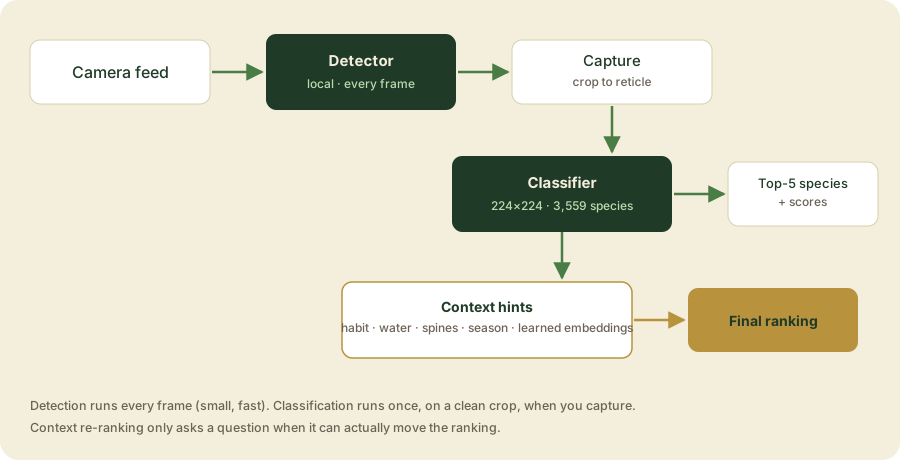
Finding a plant in a photo is really two jobs. So I use two models.
- Detection — Where is the plant in the frame? A live model looks at the camera and draws a box around the plant. It ignores the background, your hand, the sky, the pot.
- Classification — What species is it? A second, bigger model looks at that plant and picks one answer from 3,559 species.
I split the job this way because it works better on a phone. The detector is small and fast, so it can run on every camera frame. The classifier is big and accurate, so it only runs once, on a clean photo, right when you tap the shutter.
Stage 1 — Detection (the live viewfinder)
The detector is a small on-device object-detection model. It runs locally in live-detection mode, with each platform using its own optimized model file:
- Android:
plant_detector.tflite(TensorFlow Lite, about 12 MB) - iOS:
plant_detector.mlpackage(Core ML, about 5.5 MB)
It runs all the time on the camera feed. It only shows a detection if it is at least 50% sure (a confidence threshold of 0.50). To keep the camera smooth, I push detection results through a ValueNotifier instead of rebuilding the whole screen every frame. That way the preview stays smooth even though the model runs many times a second.
There is also a reticle on screen — the box you frame the plant in. I only look at detections inside that reticle, so the app follows the plant you are pointing at, not something at the edge of the screen. When a detection moves in or out of the reticle, the UI animates. That is the "lock-on" feeling while you scan.
Once you tap to capture, the detector's job is done. It hands off one photo frame (captureFrame()). I crop that photo to the reticle and shrink it before the classifier sees it.
Stage 2 — Classification (the 3,559-way decision)
The classifier does the hard part. It is a fine-tuned on-device image classification model, one version per platform.
- Android: a
.tflitemodel (about 38 MB), run withtflite_flutter - iOS: the Core ML version, run through Vision
Getting the photo ready. The cropped photo is resized to 224×224 pixels. Then it is packed into the shape the model expects ([1, 224, 224, 3], called NHWC — the code can also handle NCHW if needed, by checking the model's input shape when it loads). The pixel values are scaled to match how the model was trained.
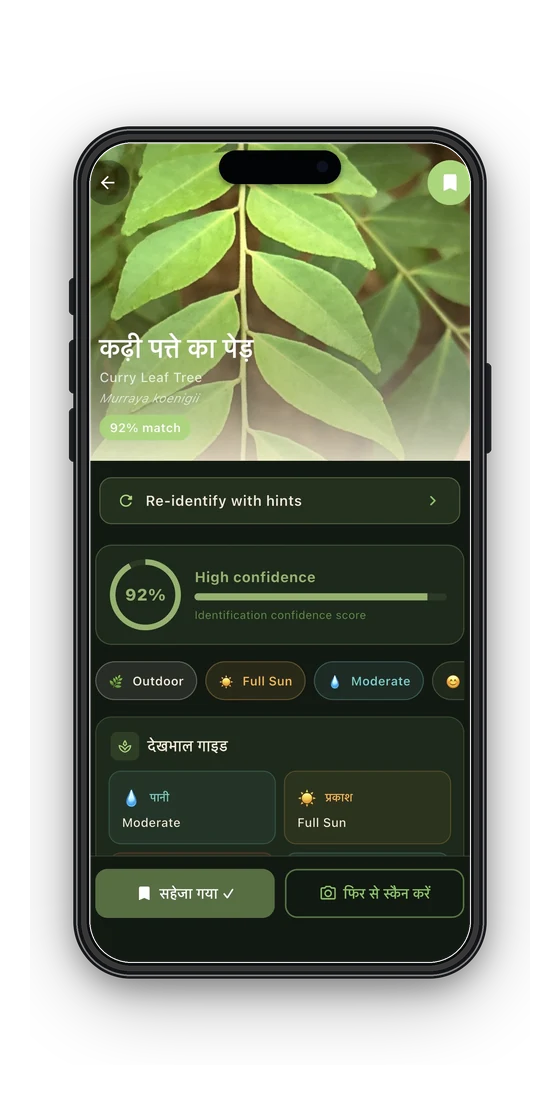
Reading the result. The model gives back two things: a list of probabilities, one per species, and raw logits. I sort the probabilities and keep the top 5 species. The highest one becomes the "confidence" score you see.
Why not one big model instead of two? Because these are different jobs. A single model that had to find the plant and also tell apart 3,559 similar species would be huge and slow. Splitting them lets each one do its job well. It also means I can improve the classifier on its own (v4 today, more later) without touching the live camera code.
Making a single photo more reliable
One photo is not always enough. Leaves move. Light changes. Some plants look almost the same. So SASYA adds three more steps on top of the classifier.
1. Multi-frame averaging
You can scan the same plant from a few angles. Each photo is classified on its own, and then the scores are combined. A species that keeps showing up strong across angles moves up. A one-time fluke fades out.
2. Context hints (asking after the scan)
This is how SASYA tells apart plants that look almost the same. After it identifies the plant, it can ask a few short questions: is it a tree, shrub, herb, or climber? Is it near water? Does it have spines? Is it indoors or outdoors? What season is it? Each answer changes the score for each candidate species, through PlantSpeciesData.contextScore(). Some signals count more than others, based on how much I trust the data behind them:
| Signal | Weight | Source | Coverage |
|---|---|---|---|
| Plant form (habit) | 1.2 | habit field | ~99% |
| Indoor/outdoor setting | 1.0 | iNaturalist | growing |
| Near water | 0.9 | habitat text | ~14% |
| Climber/vine | 0.9 | habit field | reliable |
| Spines/thorns | 0.6 | text match | sparse |
| Flowering season | 0.6 | flowering_months | ~4% |
This context score becomes a boost (0.70 + contextScore × 0.60) that multiplies each candidate's score. So a spiny shrub near water, flowering this month, moves up toward the species that actually match those facts. The model does not need to get everything right from the photo alone. And these questions only come after the scan, so you are only bothered when it actually helps.
3. Learned embeddings (it remembers)
Every time you confirm a plant, SASYA saves that scan's full set of probabilities as an embedding, a small block of numbers. Next time you scan, the new result is compared to your saved embeddings using cosine similarity. If an old confirmed match for species X is at least 0.80 similar to the new scan, X's score gets boosted, up to 1.4×. So the more you scan the same plant in your garden, the faster and more correctly SASYA finds it again. This memory stays on your phone. Nothing is sent anywhere to train a shared model.
Confidence
The top score shows as high, medium, or low, and the next closest matches are always listed too. If the score is below 0.50, SASYA tells you it is not sure, and suggests scanning again or adding hints. I would rather have it say "not sure" than give a confident wrong answer.
Why on-device?
Everything above runs on your phone, using TensorFlow Lite on Android and Core ML on iOS.
- Privacy. Your photos never leave your phone. There is nothing to upload or store.
- Offline. It works on a trail, in a field, on a flight. Anywhere, no signal needed.
- No made-up answers. It is plain visual classification based on real training data, not a text model guessing.
- Cost. No servers to run means the app can stay free.
The cost of this is model size, since the classifier lives inside the app, and the work to keep it fast on a phone. That is why detection and classification are split, the input is resized to 224×224, and each platform gets its own ML runtime.
What's next
This same setup leaves room to add more later. A disease-detection model, what's wrong with the plant, not just what it is, can slot in as another classifier on the same system. And better trait data will keep improving the context questions for plants that look alike.